
POST 4 · ISA 18.2 SERIES
Designing the System – Priority, Setpoints, and the HMI
An Automated NSW Smart Solutions Guide
Publish Date: 08/13/26
Rationalization tells you what should alarm you. Design decides how loud it shouts and where the operator sees it.
A rationalized alarm list is only half the job. The other half is turning those decisions into settings a real operator interacts with: a priority level, a deadband, a delay, a color on a screen. Get these wrong and a well-rationalized system can still flood an operator or bury the one alarm that actually matters. This post covers the three design decisions that do the most damage when handled carelessly: priority, basic alarm design, and the HMI.
Alarm Priority: Probably Backwards
Ask most building automation teams how many of their alarms are critical, and the honest answer is usually most of them. That’s the opposite of what ISA-18.2 recommends, and it’s a major reason operators stop trusting alarms altogether. When everything is high priority, nothing is.

In plain terms: the vast majority of alarms should be low priority, a smaller share medium, and only a small fraction should demand immediate action. Priority is supposed to be a filter that tells the operator where to look first. If 80 percent of alarms are marked critical instead, the filter does nothing.
How Priority Should Actually Be Set
Priority comes from two inputs decided during rationalization: how severe the consequence is if the operator does nothing, and how much time they have to respond before that consequence happens. A serious consequence with a short response window is high priority. A minor consequence with hours to respond is low priority, even if it feels urgent in the moment. Priority is not a measure of how often an alarm happens or how annoying it is. Frequency and priority are two different problems, and conflating them is how systems end up with everything set to high.
Basic Alarm Design
Once priority is set, three settings determine whether an alarm behaves like a signal or like noise: setpoint, deadband, and delay.
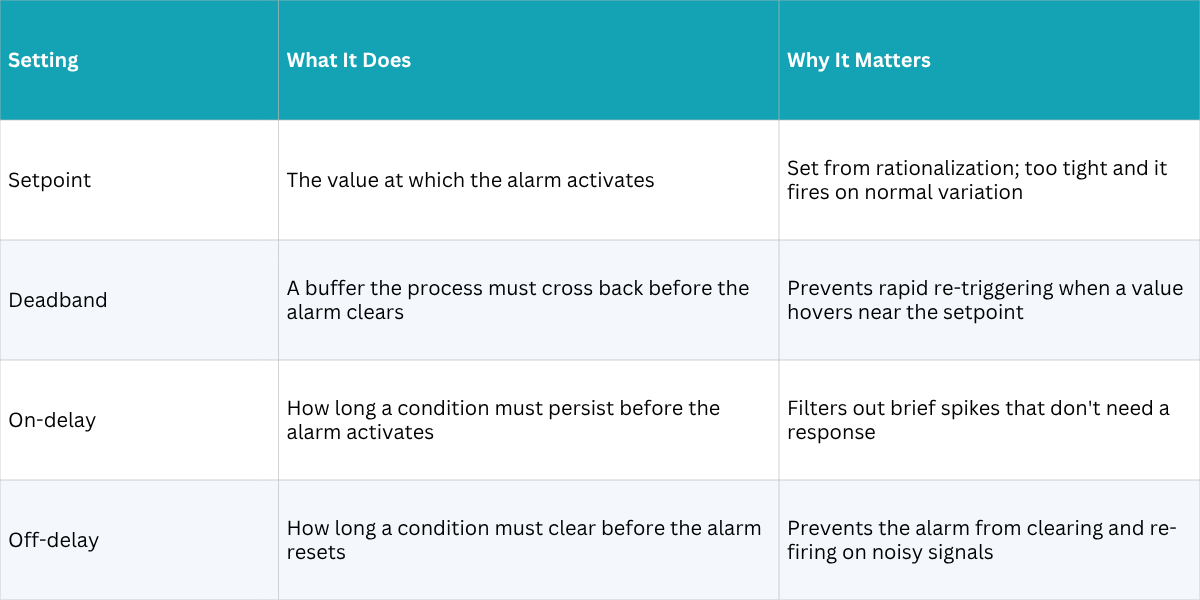
These four settings work together. A setpoint without a deadband will chatter every time the process value bounces around the threshold. A deadband without a delay still won’t stop a signal that’s genuinely noisy from triggering repeatedly. Getting this combination right for a given point usually takes a couple of iterations after commissioning, once real process data is available to tune against.

HMI Design: What Operators Need to See
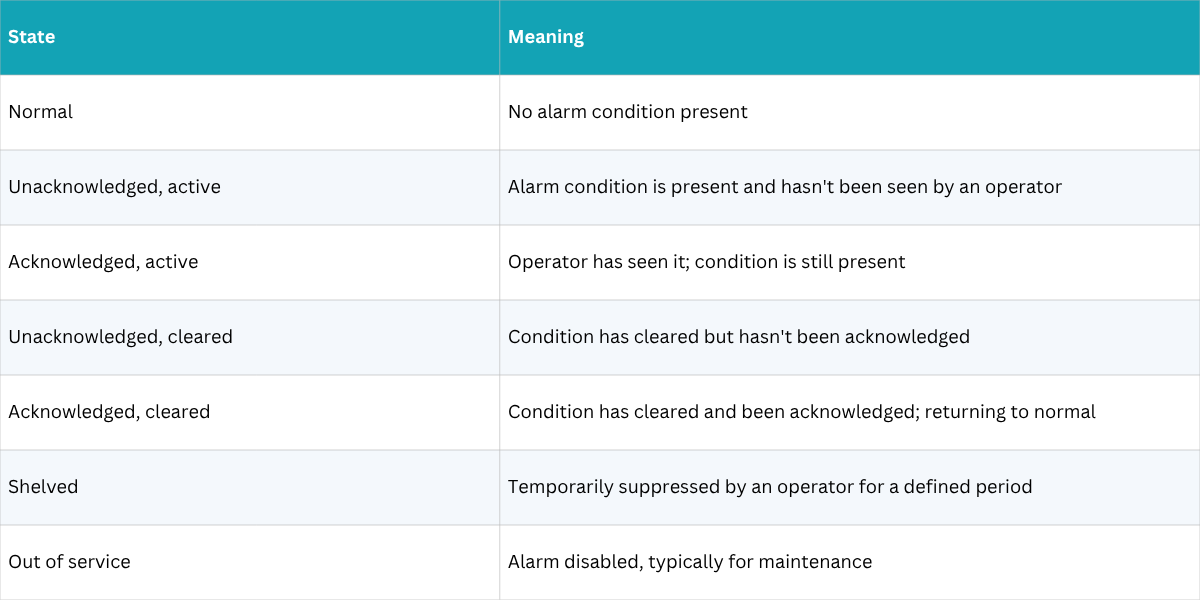
Everything above is invisible to the operator unless the interface presents it clearly. ISA-18.2 defines seven distinct alarm states, and a well-designed HMI makes the current state of any alarm obvious at a glance, not something the operator has to click into to figure out.
Design Practices That Actually Help
- Color coding tied to priority, not just red and green. Reserve red for the highest priority so it retains meaning.
- An alarm summary display sorted by priority and time. Operators should never have to hunt across multiple screens during a flood.
- Visible shelving and out-of-service indicators. A suppressed alarm that looks identical to a normal point is a hidden hazard.
- Consistent iconography across every graphic. If acknowledgment looks different from one screen to the next, operators lose seconds they don’t have during an event.

Priority, basic design, and HMI are where a rationalized alarm list either becomes usable or becomes another source of noise. None of these decisions is complicated on its own. What makes them hard is doing them consistently, alarm by alarm, across an entire facility, which is exactly why the philosophy and rationalization work from the last post has to come first.
Is Your System Designed to Hit Its Targets?
If you are designing a system with tight control requirements or working to bring an existing system into spec, contact us. We will help you get there.
www.automatednsw.com | support@automatednsw.com
UP NEXT Post 5 covers what happens after go-live: advanced alarming techniques, measuring and fixing nuisance alarms, and keeping the system from drifting through undocumented changes.